Game guide
How to play Liner Notes
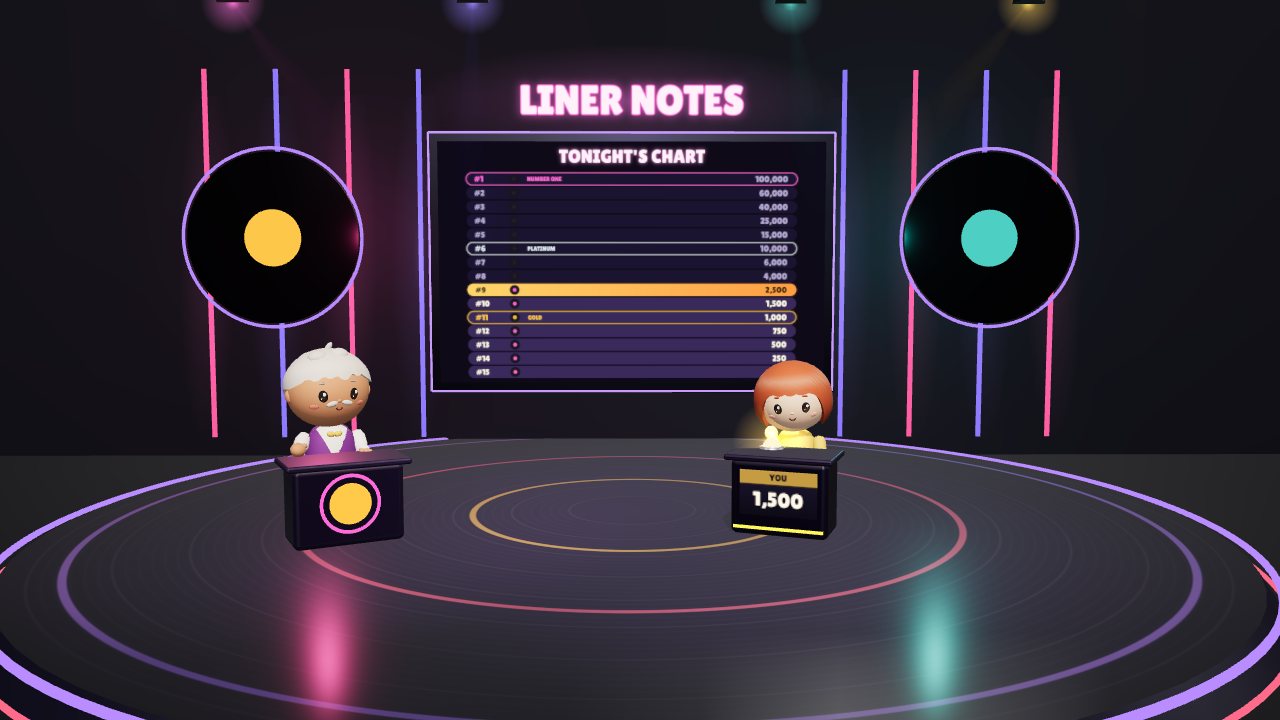
Liner Notes is a free music trivia game show on a 3D studio set: you pick tonight's artists, and Sonny the host asks you fifteen questions about their songs, each one on the clock and each answer followed by a liner note about the song. Your goal is to climb tonight's chart from #15 to number one and 100,000 points, or to take a bow with what you've won before a wrong answer ends the show.
 Play Liner Notes
- Genre
- Music trivia game show, on a 3D studio set
- Players
- One player
- Length
- Each question is on the clock for 20 to 30 seconds (40 to 60 with More time), then comes its answer and liner note. A show that ends early can be over in a minute or so; a full climb of fifteen questions takes about 5 to 10 minutes.
- Plays on
- Phones, tablets and computers, in a web browser with WebGL, with no download. Mouse, keyboard or touch, upright or sideways on a phone; no gamepad. A show needs an internet connection the whole way through.
- Progress
- Saved in this browser on this device: the sound and More time settings, your look, the artists you picked last, and your record (shows played, best points, highest place on the chart and number ones). A show in progress isn't saved: the questions come from playogames.com's server one at a time, and each answer is checked there, so closing the page ends the show. If your connection drops, the game says so and offers Try again. A private window may not keep anything.
- Price
- Free. No download and no account.
- Version
- 1.0.0, updated October 12, 2026
How to play
- Press Play the show on the start screen. You can choose one of four looks for yourself there first, under Your look.
- Who's tonight's show about? lists 272 artists, best known first. Type in Find an artist to narrow the list, then press up to 10 names (press one again to drop it), or press Surprise me to get three of the best known instead. Your picks show above the list, and Start the show opens once you have at least one. Every question will be about their songs.
- Sonny welcomes you, and How to play sums up the rules under tonight's artists. If you'd like longer on each question, turn on More time here, then press Let's play.
- Each question names its song and artist; questions 3, 8 and 13 are usually a mystery song instead, where you pick which of the artist's songs a fact is about. Pick an answer (the button below turns into Lock in with its letter), change your mind if you like, then lock it in before the ring beside that button runs out: 20 seconds a question for the first five, 25 for the next five and 30 for the last five.
- After a short pause you see the answer. A right one climbs a place on tonight's chart, the screen on the studio's back wall. A wrong one ends the show, and so does the clock running out. Either way you get a liner note, a fact about the song, and Report a problem with this question if something looks wrong.
- Question 5 is for Gold (#11, 1,000 points) and question 10 for Platinum (#6, 10,000). Once you've reached one, a wrong answer still leaves you with its points; before Gold, it leaves you with nothing. The bar along the top always says what you'd keep if you miss.
- Three helps, once each a show: Scratch two takes off two wrong answers, Crowd vote has the studio audience vote, and Flip side swaps the question for a new one at the same level. From the second question on, Take a bow ends the show with everything you've won so far, after asking once more. Answer all fifteen and you reach number one with 100,000 points; the results show your points, how high you climbed, the helps you used and your best, and Play another show takes you back to tonight's artists.
Controls
Keyboard
| Control | What it does |
|---|---|
| 1, 2, 3, 4 or A, B, C, D | Pick that answer during a question; press another to change your mind |
| Enter | Lock in the answer you picked, or press the button that has focus (Let's play, Next question and so on) |
| Tab, then Enter or Space | Move to any button and press it: the artist list, the helps, Take a bow and the menus all work by keyboard |
| Type in Find an artist | Narrow the list of artists; Escape clears what you typed |
| Escape or P | Open the pause menu during a show (P works when no button has focus); Escape again resumes |
| M | Sound on or off, when no button has focus (the ♪ button always works) |
Mouse
| Control | What it does |
|---|---|
| Click an artist's name | Pick them for tonight's show, or drop them; click a name in your picks, above the list, to remove it |
| Click an answer, then Lock it in | Choose an answer (click another to change your mind), then lock it in |
| Click Scratch two, Crowd vote or Flip side | Use that help, once each a show |
| Click Take a bow | Leave with what you've won, then press Yes, take a bow, or Keep playing |
| Click ≡ at the end of the top bar | Pause menu: Resume, More time or Leave the show |
| Click ♪ | Sound on or off |
Touch (phones and tablets)
| Control | What it does |
|---|---|
| Tap Find an artist, then an artist's name | Type to narrow the list, then pick or drop that artist |
| Tap an answer, then Lock it in | Choose an answer (tap another to change your mind), then lock it in |
| Tap a help | Scratch two, Crowd vote or Flip side, once each a show |
| Tap Take a bow | Leave with what you've won, after one more tap to say yes |
| Tap ≡ or ♪ | Open the pause menu, or turn the sound on or off |
Tips
- Take a bow matters most just before a safe place: on question 10 a miss drops you from 6,000 points to 1,000, and on question 15 from 60,000 to 10,000. Right after Gold or Platinum (questions 6 and 11), a miss keeps exactly what a bow would, so you lose nothing by answering.
- Crowd vote is surest early on: on questions 1 to 5 the right answer always gets at least half the vote (50 to 82%), on 6 to 10 it gets 34 to 64%, and on 11 to 15 only 22 to 50%, so near the top a wrong answer can win the vote. If you use both helps on a hard question, take the Crowd vote before Scratch two: the scratched answers' votes then go to the answers left.
- The clock doesn't run while a help is on its way, and it waits a moment more while Scratch two or the Crowd vote plays out. Flip side gives the new question a full clock of its own, so it's still worth pressing late on a question you don't know.
- Lock it in as soon as you're sure: an answer you've picked but not locked in counts for nothing when the time runs out. The clock keeps going while Take a bow asks if you're sure, and time in another tab or app counts too; only the pause menu stops it, and the menu hides the question until you resume.
- More time doubles every clock, to 40, 50 and 60 seconds, and changes nothing about your points. Turn it on in How to play or the pause menu: it's saved for your next show, and switching it mid-question keeps the share of time you had left.
- Your artists take turns, question by question: with one artist all fifteen are about their songs, with three each gets about five, and with ten each gets one or two. The first five questions favour each artist's better-known songs, so pick artists whose hits you know.
Screenshots


Recent updates
Version 1.0.0 · October 12, 2026
The first numbered release, on playogames.com's home page and on itch.io.
- Pick tonight's artists. Every show is about the artists you choose: one, or up to ten, from a list of 272. Type part of a name to find one fast, or press Surprise me. Every question is about their songs.
- On the clock. Each question has 20 seconds (25 from #10, 30 from #5) to lock in an answer. The clock waits while a help is on its way and stops in the pause menu. More time, on the introduction and in the menu, doubles it.
- The card for Karaoke Sync, our karaoke app, sits centred under your results.
Before 1.0.0 (the chart show, 2026-10-05 to 2026-10-11):
- A clearer start to every show: "How to play" in three short steps. Climb the chart, Gold and Platinum are safe, and if you're not sure, take a bow. The three helps get a line of their own.
- The chart on the studio wall now explains itself: a padlock and the word SAFE on Gold and Platinum, a tick on every place you've climbed, an arrow on the one you're playing for, and START on #15.
- The bar along the top says it in words: "Question 3 of 15 for 500 points", and "If you miss, you keep 0".
- The gold buttons stay gold when the mouse is over them (they used to go dark).
- Liner Notes is now a show you play on your own: fifteen questions climb tonight's chart from #15 to number one, each worth more than the last, up to 100,000 points.
- No buzzers. Pick an answer, change your mind if you like, then lock it in.
- Reach Gold (#11) and Platinum (#6) and those points are yours to keep, even if you miss one later.
- Three helps, once each a show: Scratch two (two wrong answers scratched off), Crowd vote (the studio audience votes) and Flip side (a new question at the same level).
- Not sure? Take a bow and keep everything you've won so far.
- Every question still names its song and artist, and every answer comes with a liner note about what you were just asked (a question about a release date gets the story of the release, not a random fact about the song).
- Maya and Dev have left the show, and so has the board.
- The questions now come from our studio one at a time, and each answer is checked there. If your connection drops mid-show, the game says so and keeps your place: Try again carries on.
More games
-
 Hit Your Dot
One marching band season: band camp, Friday nights, contests. March your drill and hit your dot.
How to play Hit Your Dot -
 Cake Drop
Drop desserts into a glass case. Two of a kind merge. Build the Master Pastry before it overflows.
How to play Cake Drop -
 The Gilded Needle
A Victorian dress shop in 3D. Design, cut, sew and trim gowns, then read the gossip.
How to play The Gilded Needle